Trending Gemini AI Photo Prompts for Baby Girl (Copy and Paste)
Gemini AI Photo Prompts: Do you want to turn your simple baby girl photos into stunning, ultra-realistic portraits? You don’t need to be a photo expert or a digital artist. With modern AI tools like Gemini-based photo editors, you can easily transform your pictures using simple text commands called prompts.
A good prompt is just like giving an order to an AI artist. The clearer your instruction, the better your final picture will look. In this post, you will find long, detailed, copy-and-paste Gemini AI prompts that add realism, lighting, and beautiful backgrounds to your baby girl’s photos.
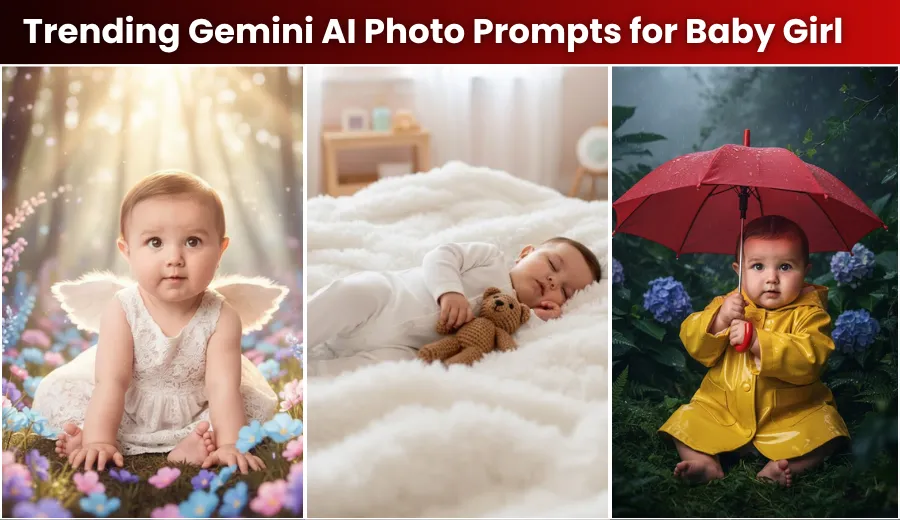
Gemini AI Photo Prompts for Baby Girl
1. Magical Fairy Tale Look
These prompts give your baby girl’s photo a dreamy fairy-tale style, filled with soft light, flowers, and a magical mood.
Prompt 1.1
Change the background to a dreamy, soft-focus forest clearing with glowing pastel flowers and sunlight filtering through the trees. Dress the baby in a tiny white lace dress with little wings. Apply an ultra-realistic, high-resolution filter with cinematic soft lighting. Keep the baby girl’s face and expression exactly the same as in the original photo.
Prompt 1.2
Edit the background into a whimsical watercolor painting of a castle in the clouds at sunrise. Add a delicate silver tiara to the baby’s head. Enhance the image with golden-hour lighting, a bokeh effect (blurred lights), and an 8K ultra-HD realistic finish. Maintain the exact facial features and natural expression of the baby girl.
Prompt 1.3
Change the baby’s pose to gently sitting inside a large hollow pumpkin with a glowing lantern beside it. The background should show a soft autumn setting with fallen leaves. Apply a hyper-realistic effect, natural skin-tone correction, and studio-style portrait lighting. Keep the baby’s original face unchanged.
Prompt 1.4
Replace the background with a calm underwater scene where the baby floats gently with small bubbles around her, dressed as a little mermaid with a soft tail. Use deep ocean colors, glowing subsurface light, and a flawless, ultra-realistic digital painting style. Do not change the baby girl’s face, eyes, or any unique features.
Prompt 1.5
Place the baby girl kneeling on bright green moss, gently holding a small bird in her hand. The background should look like a magical forest with mushrooms and glowing fireflies. Use a vintage film-grain effect, rich vibrant colors, and natural daylight. Preserve the baby’s original face and skin texture exactly as in the uploaded picture.
2. Cozy and Warm Indoor Vibe
If you prefer a peaceful, home-like setting, these prompts give the photo a comforting indoor look with soft blankets, gentle lighting, and a heartwarming atmosphere.
Prompt 2.1
Set the baby sleeping peacefully on a fluffy white cloud-like blanket inside a bright nursery. Add a small knitted teddy bear beside her. Apply soft indoor natural light, an ultra-sharp focus filter, and 8K photo-realistic quality. Keep the baby’s face and original sleeping expression exactly the same.
Prompt 2.2
Edit the baby girl sitting in a large velvet armchair near a warm fireplace. Show wooden shelves filled with vintage books in the background. Use warm tungsten lighting, a deep-shadow effect for depth, and an editorial portrait style. The baby’s facial features and skin tone must perfectly match the original image.
Prompt 2.3
Change the background to a modern minimalist room with a large window and sheer curtains letting in soft morning light. Dress the baby in a simple knit sweater. Use a clean, high-key photography style with natural, de-saturated colors and ultra-realistic texture. Keep the baby’s face exactly as in the uploaded photo.
Prompt 2.4
Place the baby girl laughing while playing with colorful wooden blocks on a soft rug in a Scandinavian-style living room. Use bright but soft light from a nearby lamp and apply a professional-grade realism filter. The baby girl’s smile and eyes should remain unchanged.
Prompt 2.5
Show the baby girl wrapped snugly in a pastel rainbow-colored shawl, with a cup of cocoa beside her (out of reach). The background should be a cozy bed with soft pillows. Apply cinematic depth-of-field (bokeh) and warm golden lighting while keeping the skin texture natural. Do not alter the baby’s original facial features.
3. Cinematic Outdoor Masterpiece
For those who love natural scenery, these prompts bring out beautiful outdoor vibes with cinematic tones and breathtaking light effects.
Prompt 3.1
Set the scene on rolling green hills during sunset. Dress the baby in a cotton dress and place a single dandelion in her hand. Use a cinematic wide-angle lens effect, golden light flares, and hyper-detailed realism. Preserve the baby girl’s face and hair exactly as in the original picture.
Prompt 3.2
Change the background to a misty garden after light rain, with visible dewdrops on the leaves. Give the baby a small yellow raincoat and red umbrella. Apply darker contrast lighting with vibrant colors on the clothes and extreme realism. Keep the baby girl’s facial features and expression identical to the original photo.
Prompt 3.3
Place the baby standing on wet beach sand with gentle waves in the background under a soft blue sky. Add scattered seashells near her feet. Use natural sunlight, a high-speed photography look, and sharp, realistic details. Maintain all original facial features.
Prompt 3.4
Edit the background into a sunflower field under a bright blue sky with white clouds. Dress the baby in a straw hat with a pink ribbon. Apply vibrant color grading, a shallow depth of field, and professional portrait realism. The baby girl’s original face must remain unchanged.
Prompt 3.5
Set the baby girl on a wooden swing tied to an old oak tree in a countryside park, with a basket of apples nearby. Use soft natural daylight, a vintage film style with light grain, and photo-lab quality realism. Keep her exact expression, skin tone, and face from the uploaded image.
Final Thoughts – Be the Artist of Your Own Photo
Now you’ve seen how easily you can transform a simple baby photo into an artistic masterpiece using Gemini AI or similar tools. Just follow a few simple rules:
- Always upload a high-quality original photo.
- Copy and paste the prompts given above directly into your AI tool.
- Include the line “Keep the baby girl’s face 100% same as the original photo.”
You can customize the prompts further by changing dress colors, flower types, lighting time, or background themes.
With the right creativity and attention to detail, your baby girl’s photo will look naturally stunning — as if it were captured by a professional photographer.